Export and run Segment Anything models with SAMExporter
SAMExporter (opens in a new tab) converts promptable segmentation models into portable ONNX encoder/decoder graphs. Use it when you need SAM outside a PyTorch process, want explicit ONNX Runtime accelerators, or need reproducible model files for AnyLearning or another local application.
The examples on this page use real models and images. No mock prediction is shown as quality evidence.
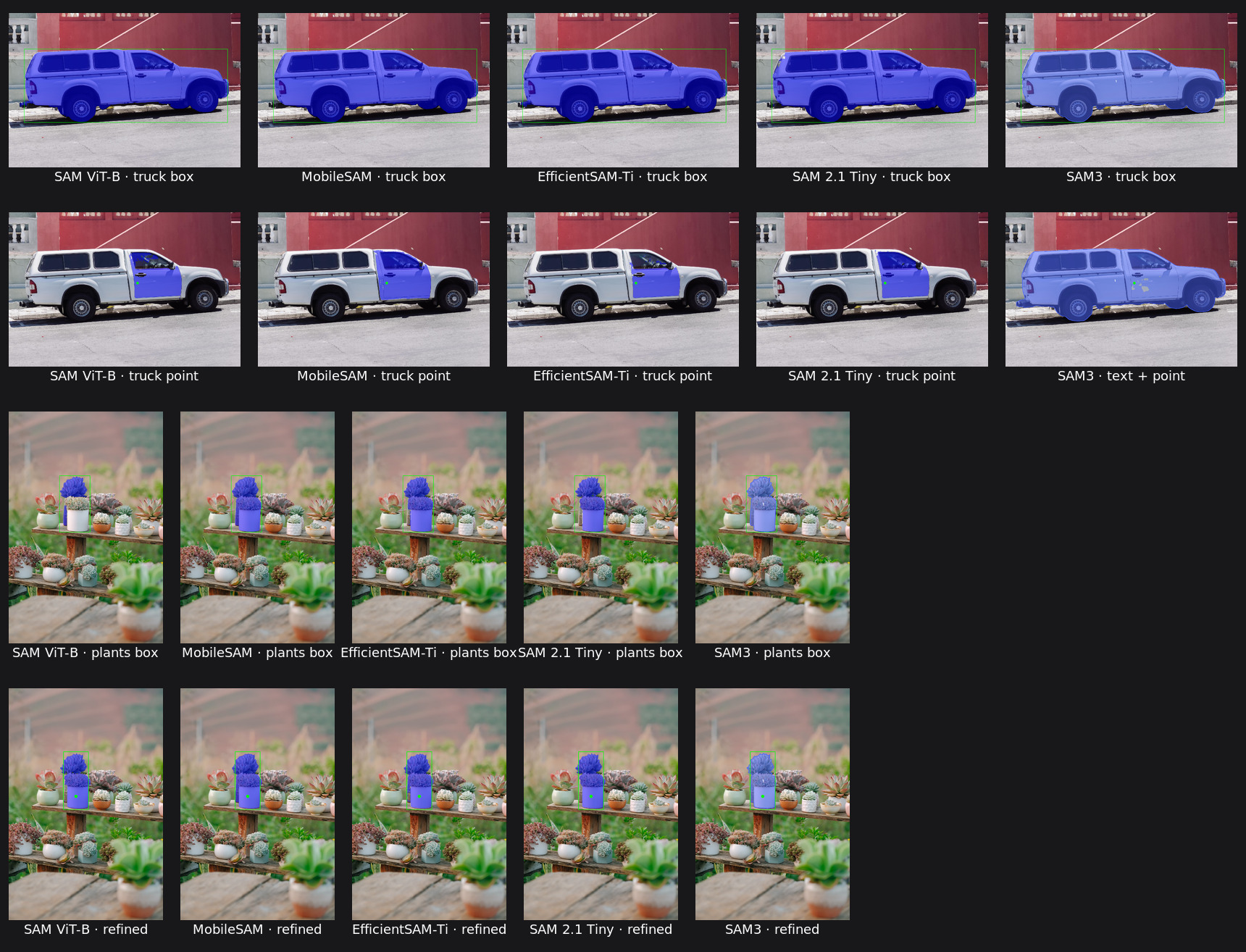
Supported families
| Family | Published ONNX files | Prompts | Practical use |
|---|---|---|---|
| SAM ViT-B | encoder + decoder (opens in a new tab) | point, negative point, rectangle | Original SAM compatibility and quality |
| MobileSAM | TinyViT encoder + SAM decoder (opens in a new tab) | point, negative point, rectangle | Fast CPU and smaller packages |
| EfficientSAM-Ti | official split ONNX (opens in a new tab) | point, rectangle | Smallest validated split pair |
| SAM 2.1 Tiny | encoder + decoder (opens in a new tab) | point, negative point, rectangle, mask refinement | Modern image segmentation |
| SAM3 | image, language and decoder graphs (opens in a new tab) | text and positive/negative geometry | Open-vocabulary instance discovery |
SAMExporter currently exports the SAM2 image path, not its temporal memory or video tracker. SAM3 geometry is a concept exemplar rather than a crop. The CLI adds prompt-focused selection when geometry is supplied.
Install
Python 3.11 or newer is required by SAMExporter.
git clone --recurse-submodules https://github.com/vietanhdev/samexporter.git
cd samexporter
python -m venv .venv
source .venv/bin/activate
pip install -e ".[runtime-cpu,export]"
The repository pins the current official SAM, SAM2 and SAM3 source revisions as submodules. Run this after an existing clone or branch switch:
git submodule sync --recursive
git submodule update --init --recursive
Download validated ONNX models
NRL.ai publishes the exact artifacts used for the examples at
nrl-ai/samexporter-onnx-models (opens in a new tab).
Download one family with the Hugging Face CLI:
pip install -U huggingface_hub

hf download nrl-ai/samexporter-onnx-models \
  --include "mobile_sam/*" \
  --local-dir output_models
Use revision 3c4a5640a91ea73235d78f1b79b4613f64b768b6 for byte-for-byte
reproduction of the models shown here:
hf download nrl-ai/samexporter-onnx-models \
  --revision 3c4a5640a91ea73235d78f1b79b4613f64b768b6 \
  --local-dir output_models
The Hub repository includes complete SHA-256 checksums, upstream revisions and
the applicable license in every family directory. Keep
sam3_decoder.onnx.data beside sam3_decoder.onnx.
Prompt files
Commands below read a JSON array of marks. Coordinates are pixels in the original image, so portrait, landscape and non-square inputs keep their natural aspect ratio.
[
  { "type": "rectangle", "data": [325, 410, 520, 770] },
  { "type": "point", "data": [430, 690], "label": 1 },
  { "type": "point", "data": [500, 690], "label": 0 }
]
label: 1includes the clicked region.label: 0excludes the clicked region.rectangleis[x1, y1, x2, y2].- SAM3 additionally accepts
{"type": "text", "data": "plant"}or the more convenient--text_prompt "plant"option.
Convert SAM ViT-H, ViT-L or ViT-B
Download an official checkpoint:
Export the encoder and decoder. Replace vit_b and the paths with vit_l or
vit_h for the larger checkpoints.
python -m samexporter.export_encoder \
  --checkpoint original_models/sam_vit_b_01ec64.pth \
  --output output_models/sam_vit_b/sam_vit_b.encoder.onnx \
  --model-type vit_b \
  --use-preprocess \
  --opset 18

python -m samexporter.export_decoder \
  --checkpoint original_models/sam_vit_b_01ec64.pth \
  --output output_models/sam_vit_b/sam_vit_b.decoder.onnx \
  --model-type vit_b \
  --return-single-mask \
  --opset 18
--use-preprocess embeds resize, padding and normalization in the encoder. Omit
it only when your application deliberately performs the exact preprocessing.
ViT-H uses an ONNX external-data companion because of its size; keep that file
with the graph. Optional --quantize-out path.onnx creates a dynamic UINT8
variant, but benchmark it on the target CPU before assuming it is faster.
Run it:
python -m samexporter.inference \
  --sam_variant sam \
  --encoder_model output_models/sam_vit_b/sam_vit_b.encoder.onnx \
  --decoder_model output_models/sam_vit_b/sam_vit_b.decoder.onnx \
  --image images/truck.jpg \
  --prompt images/truck_box.json \
  --output visual_results/sam_vit_b_truck.png
Convert MobileSAM
Download the official
mobile_sam.pt (opens in a new tab)
checkpoint, then use the mobile model type for both split graphs:
python -m samexporter.export_encoder \
  --checkpoint original_models/mobile_sam.pt \
  --output output_models/mobile_sam/mobile_sam.encoder.onnx \
  --model-type mobile \
  --use-preprocess \
  --opset 18

python -m samexporter.export_decoder \
  --checkpoint original_models/mobile_sam.pt \
  --output output_models/mobile_sam/mobile_sam.decoder.onnx \
  --model-type mobile \
  --return-single-mask \
  --opset 18
Inference uses --sam_variant sam because MobileSAM intentionally shares the
original SAM prompt/decoder contract.
Use EfficientSAM-Ti or EfficientSAM-S
SAMExporter runs the official split EfficientSAM ONNX contract directly. The
validated Ti pair is in the NRL.ai model repository; upstream also publishes
Ti/S conversion code under Apache-2.0 in
yformer/EfficientSAM (opens in a new tab).
To convert the upstream checkpoints yourself, use its exporter. It writes both the combined graphs and the split encoder/decoder pairs for Ti and S:
git clone https://github.com/yformer/EfficientSAM.git
cd EfficientSAM
pip install -e . onnx onnxruntime
python export_to_onnx.py

# Outputs used by SAMExporter:
# weights/efficient_sam_vitt_encoder.onnx
# weights/efficient_sam_vitt_decoder.onnx
# weights/efficient_sam_vits_encoder.onnx
# weights/efficient_sam_vits_decoder.onnx
This is an upstream conversion path rather than a SAMExporter CLI because the architecture and tensor contract are different from Meta SAM.
python -m samexporter.inference \
  --sam_variant efficient_sam \
  --encoder_model output_models/efficient_sam_ti/efficientsam_ti_encoder.onnx \
  --decoder_model output_models/efficient_sam_ti/efficientsam_ti_decoder.onnx \
  --image images/plants.png \
  --prompt images/plants_box.json \
  --output visual_results/efficient_sam_ti_plants.png
Convert SAM 2 and SAM 2.1
Official checkpoints are available from Meta for
SAM 2 (opens in a new tab) and
SAM 2.1 (opens in a new tab).
Supported --model_type values are:
sam2_hiera_tiny             sam2.1_hiera_tiny
sam2_hiera_small            sam2.1_hiera_small
sam2_hiera_base_plus        sam2.1_hiera_base_plus
sam2_hiera_large            sam2.1_hiera_large
Example for the recommended starting point:
SAM2_BUILD_CUDA=0 pip install -e third_party/sam2

python -m samexporter.export_sam2 \
  --checkpoint original_models/sam2.1_hiera_tiny.pt \
  --output_encoder output_models/sam2_1_hiera_tiny/sam2.1_hiera_tiny.encoder.onnx \
  --output_decoder output_models/sam2_1_hiera_tiny/sam2.1_hiera_tiny.decoder.onnx \
  --model_type sam2.1_hiera_tiny \
  --opset 18
Avoid --simplify until you measure both file size and target-runtime memory;
large encoder simplification can make artifacts larger.
python -m samexporter.inference \
  --sam_variant sam2 \
  --encoder_model output_models/sam2_1_hiera_tiny/sam2.1_hiera_tiny.encoder.onnx \
  --decoder_model output_models/sam2_1_hiera_tiny/sam2.1_hiera_tiny.decoder.onnx \
  --image images/plants.png \
  --prompt images/plants_box_refined.json \
  --output visual_results/sam2_1_tiny_plants.png
Convert and prompt SAM3
SAM3 is gated on Hugging Face. Accept Meta's terms at
facebook/sam3 (opens in a new tab), authenticate with
hf auth login, and initialize the pinned source.
The official source declares numpy>=1.26,<2; a separate export environment
is recommended if the main application uses NumPy 2.
git submodule update --init sam3
pip install -e sam3

python -m samexporter.export_sam3 \
  --output_dir output_models/sam3 \
  --opset 18 \
  --device auto \
  --max-geometric-prompts 8
--device auto chooses CUDA, MPS or CPU for export. Pass
--checkpoint /path/to/sam3.pt to avoid a Hub lookup. Geometric capacity is
fixed in the ONNX graph; re-export with a larger value when an application
needs more than eight marks.
Text-only discovery
python -m samexporter.inference \
  --sam_variant sam3 \
  --encoder_model output_models/sam3/sam3_image_encoder.onnx \
  --language_encoder_model output_models/sam3/sam3_language_encoder.onnx \
  --decoder_model output_models/sam3/sam3_decoder.onnx \
  --image images/plants.png \
  --prompt images/plants_text.json \
  --text_prompt "plant" \
  --output visual_results/sam3_plants_all.png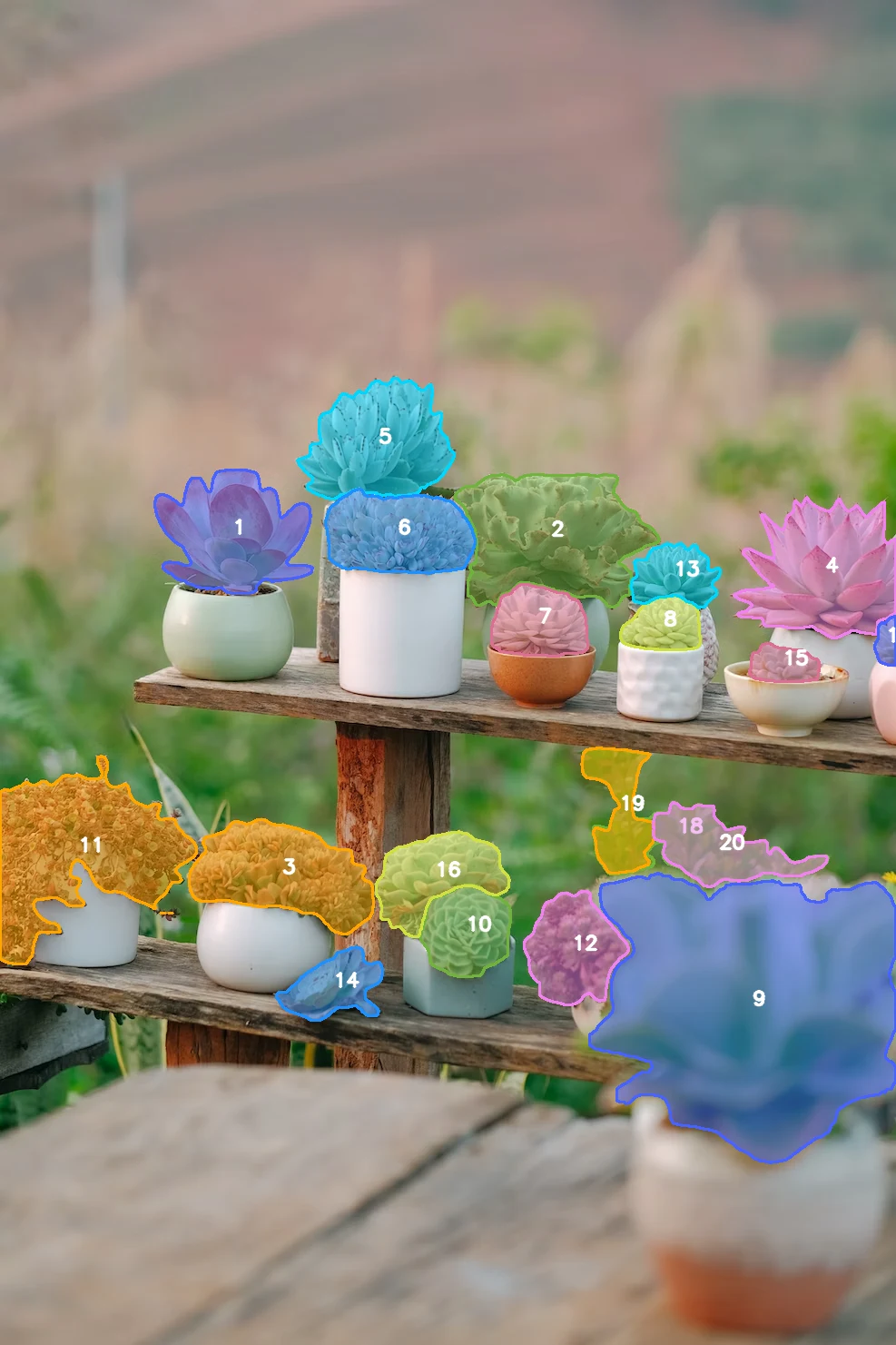
The broad concept plant finds every matching instance. This image has 20
valid plant masks after official-style mask-IoU NMS. Cap the result when a
preview should stay compact:
# Add to the text-only command above:
--max_instances 5
Geometry as selection
With a point or rectangle present, the default --sam3_output_mode auto
returns the best prompt-overlapping instance. This avoids showing every
visually related plant when the user's intent is to select one.
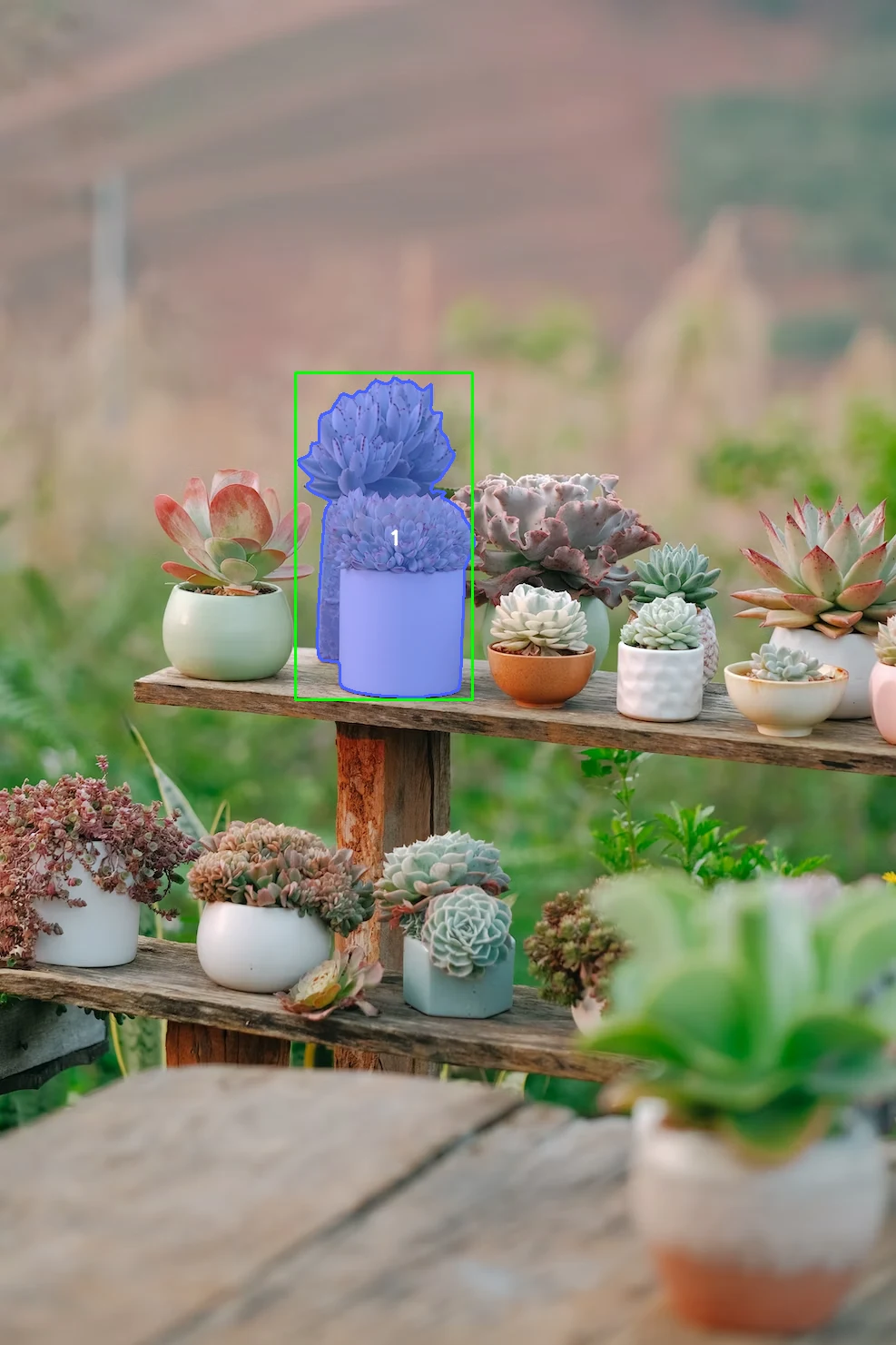
Add a positive point to a tighter rectangle for the refined example:
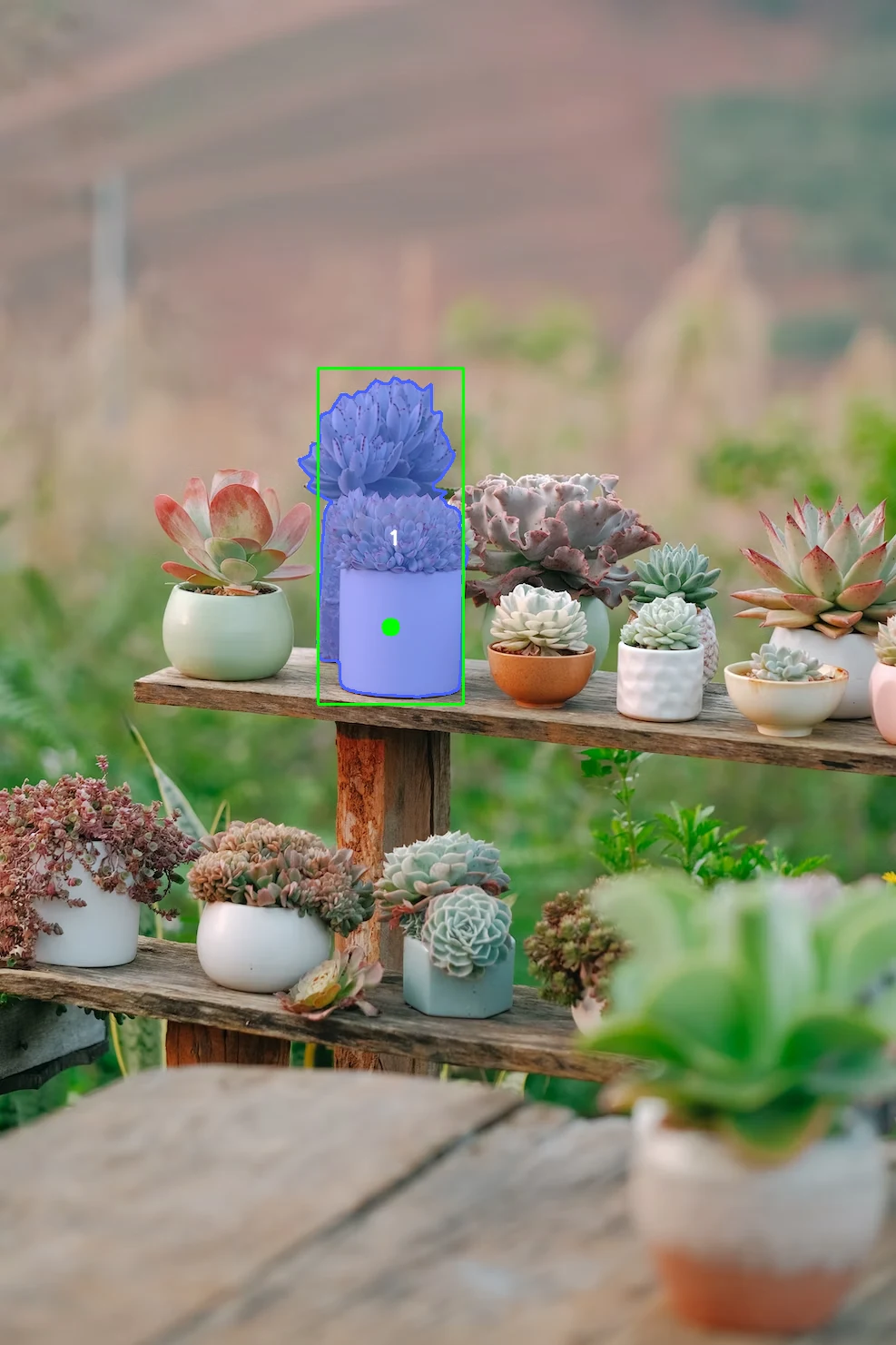
Use --sam3_output_mode all when the geometry should remain a concept exemplar
for broad discovery. Duplicate suppression defaults to official-style mask IoU:
--sam3_nms_mode mask   # default; best semantic alignment
--sam3_nms_mode box    # faster approximation
--sam3_nms_mode none   # raw thresholded queries
--nms_threshold 0.7
--confidence_threshold 0.5
A point is represented as a very small exemplar box in the PCS path. Pair a
point with a text concept such as --text_prompt "truck"; use a rectangle when
geometry has to carry the concept by itself.
Accelerators and performance
SAMExporter discovers the providers installed in the current ONNX Runtime build and keeps CPU as fallback. Override the order explicitly:
--providers tensorrt,cuda,cpu
--providers openvino,cpu
--providers coreml,cpu
--providers directml,cpu
Install the single ONNX Runtime build intended for the deployment environment:
pip install "samexporter[runtime-cpu]"       # CPU/macOS
pip install "samexporter[runtime-gpu]"       # NVIDIA CUDA/TensorRT
pip install "samexporter[runtime-openvino]"  # Intel CPU/GPU/NPU
pip install "samexporter[runtime-directml]"  # Windows DirectML
pip install "samexporter[runtime-qnn]"       # Qualcomm QNN
Do not keep multiple ONNX Runtime Python packages in one environment. Consult the official installation matrix (opens in a new tab) for the CUDA-version feeds, WinML recommendation, mobile packages, and custom provider builds.
Recognized providers include TensorRT, CUDA, TensorRT RTX, MIGraphX/ROCm, OpenVINO, DirectML, CoreML, CANN, QNN, NNAPI, Vitis AI, RKNPU, WebNN, WebGPU, XNNPACK, ACL, ArmNN and oneDNN. Availability depends on the ONNX Runtime build for the target operating system and accelerator.
For interactive tools, encode an image once and cache its embedding. Re-run only the decoder as prompts change. Start with MobileSAM or EfficientSAM-Ti for CPU responsiveness, SAM 2.1 Tiny for stronger modern masks, and SAM3 only when natural-language discovery is required. The validated SAM3 bundle uses roughly 8–9 GiB peak resident memory in a cold CPU process on the test host.
Licenses and reusable implementations
SAM, SAM2, MobileSAM and EfficientSAM are Apache-2.0. SAM3 uses Meta's separate SAM License, which is included with the published SAM3 files. Verify the model and dataset terms for your application; an ONNX conversion does not replace upstream obligations.
When adding another family, prefer an official or permissively licensed
implementation with an explicit exporter and tensor contract. Useful reference
projects include
mit-han-lab/efficientvit (opens in a new tab)
(Apache-2.0) and
qualcomm/ai-hub-models (opens in a new tab)
(BSD-3-Clause). GPL/AGPL projects can be behavioral references but should not
be copied into this Apache-2.0 application without a deliberate license review.
Reproduce and inspect results
In the SAMExporter repository:
bash download_all_models.sh
bash test_comprehensive.sh
Images and sibling logs are retained under visual_results/. Set
SAMEXPORTER_RESULTS_DIR=/absolute/path to redirect a run without losing the
evidence. Inspect boundaries, holes, prompt placement and background leakage at
full resolution; successful execution alone is not a quality check.