AnyLearning - Privacy-First Image Labeling & ML Training Desktop App
Download AnyLearning OSS
Apache-2.0 for Windows, macOS and Linux, with no account or activation.
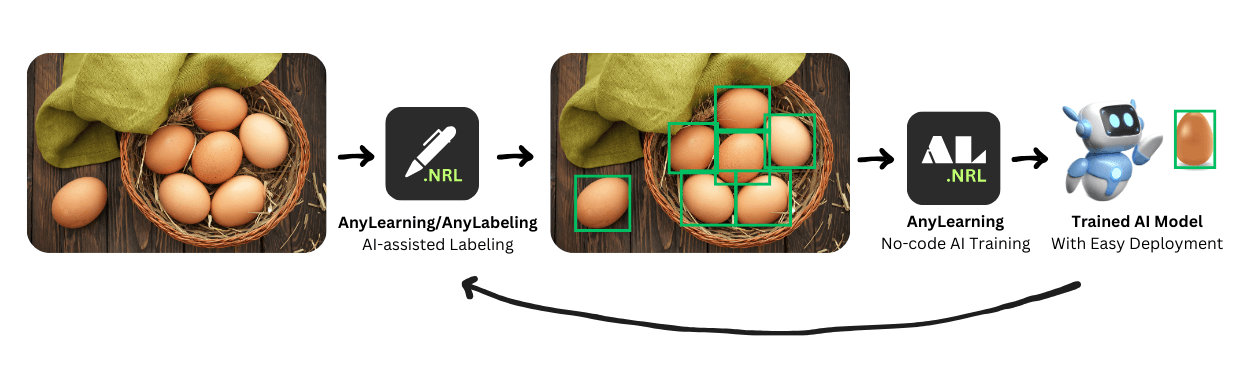
Label data and train computer vision models on your own machine. No cloud, no account, no subscription.
AnyLearning is a desktop application that does the labelling and the training in one place, on hardware you control. It is built for work where the dataset cannot be uploaded: confidential medical images, proprietary industrial designs, footage under NDA, anything a data-protection officer has an opinion about.
What "offline" means here, precisely
Python, PyTorch, the training backbones, MobileSAM, and the default SAM 2 Tiny and Small models are inside the installer. A machine with no network can label, train, evaluate and export with those bundled components.
Larger optional auto-labeling models are intentionally not duplicated inside the installer. Selecting one shows its size, downloads a checksum-pinned ONNX bundle once, and stores it locally. It runs without a network after that. The app also requests a static JSON file from our website on startup to see whether a newer version exists; that check sends no project or machine data and fails silently when offline.
Your images, annotations and trained weights are read from and written to local disk. There is no bucket, no ingest, no telemetry and no analytics.
On regulated work: because your data never reaches us, there is no third-party processor to add to a data-processing agreement. That removes one common obstacle, but compliance is a property of your whole process rather than of any single tool, so treat this as one input to your assessment and not as an answer to it.
What it does
- Label with boxes, polygons, keypoints and whole-image classes. Use local SAM-family prompts, run automatic D-FINE or RF-DETR predictions, reuse ONNX exports from project-trained RF-DETR models, or import a compatible YOLO-family ONNX model in the desktop app.
- Train eight project types: object detection, instance segmentation, image segmentation, image classification, handpose classification, keypoint detection, Tabular AI and Text AI. Runs on your GPU if you have one, on the CPU if you do not.
- Export datasets as YOLO, COCO, LabelMe or AnyLabeling, and trained models as ONNX with the config the run used.
Labels and training share one project database, so the class list you draw with is the class list the model trains on.
Built for
- Research teams with private datasets
- Healthcare and clinical imaging projects
- Industrial computer vision
- Teaching and academic research
- Individual ML engineers
- Small teams that cannot use hosted tools
Current limits
Worth knowing before you install:
- Single user, one machine. There are no collaboration features, no shared project server and no cloud sync.
- Optional auto-labeling models require a one-time download and range from small detectors to models approaching a gigabyte. The picker shows the size before downloading; bundled models remain available fully offline.
- Dataset size is bounded by your own disk and memory. It is comfortable at hundreds or thousands of images, not millions.
- On macOS, training runs on the CPU. Apple's GPU backend is not wired up yet.
- Updates are downloaded from the website and installed by you. There is no background updater.
Start here
Install AnyLearning, then take one task end to end. Choosing an ML task helps if you are not sure which one fits the decision you are trying to support.
"AnyLearning empowers developers to build powerful AI models while maintaining complete control over their data. It's the perfect solution for privacy-conscious teams and individuals." - Andrew Nguyen, Leader of AnyLearning project.